
Product
How WorkBeam Works: See What Your Team Worked On Without Timesheets or Surveillance
Learn how WorkBeam helps managers and leaders across SMBs and enterprises see what their team worked on with automatic work summaries, team visibility dashboards, and zero timesheets, screenshots, or status-update overhead.
Published April 23, 2026 · Updated April 23, 2026 · 15 min read
No credit card required · Installs in under 10 minutes
The question every manager is really asking
Whether you're leading a 10-person team or a 5,000-person organization, most managers are not searching for "employee monitoring software." They are searching for an answer to one simple question:
"What did my team actually work on this week — and did it move the right things forward?"
Most tools can't answer that well. Timesheets give you rounded-off hours that everyone fills in on Friday afternoon. Status update meetings eat an hour and still leave you guessing. Activity trackers tell you a laptop was on for seven hours, which tells you almost nothing about the actual work.
WorkBeam was built for that exact problem: helping managers and executives at companies of every size see what employees worked on, how teams are progressing, and where attention is needed next. It works equally well for a lean 15-person startup and a large enterprise with hundreds of teams. Here's how.
What you actually get: automatic work summaries for every role
Imagine if every person on your team wrote you a thoughtful paragraph at the end of every work session explaining what they worked on, what they were trying to accomplish, and how it went. Except nobody has to write anything. That's what a WorkBeam workflow summary is.
Here's what it looks like for two very different roles:
Example 1: Engineering workflow
Checkout bug triage + fix + PR review
9:12 AM - 11:05 AM · 1h 53m
github.com
Investigated checkout API timeout reports, reproduced the issue locally, patched retry logic, and shipped a reviewed PR.
Started with Sentry traces and narrowed failures to a payment provider timeout path. Reproduced via staging fixture, added bounded retry + better error mapping, and wrote regression coverage. Opened PR, addressed one review note, and merged after CI passed.
Checkout reliability hardening
Reduce payment timeout failures before Friday release
Project: WorkBeam Platform
Ran 50-minute discovery call on Zoom with TechCorp VP of Operations + 2 colleagues. Covered all 8 agenda questions and identified a clear champion.
Logged notes into HubSpot, updated MEDDPICC fields, advanced deal stage, and set next-step tasks for the sales engineer.
Example 2: Sales workflow
Live discovery call + post-call MEDDPICC updates
1:49 PM - 2:49 PM · 1h
zoom.us
Ran a qualification call with TechCorp, confirmed budget and timeline, then logged structured next steps in CRM.
Facilitated a 50-minute discovery call with TechCorp's VP of Operations and team, validated budget range and decision timeline, and identified champion + economic buyer path. After the call, updated MEDDPICC fields, moved stage to POV, and created follow-up actions for sales engineering.
Enterprise MEDDPICC playbook
Qualify TechCorp and advance to Proof of Value stage
Project: WorkBeam Sales
Ran 50-minute discovery call on Zoom with TechCorp VP of Operations + 2 colleagues. Covered all 8 agenda questions and identified a clear champion.
Logged notes into HubSpot, updated MEDDPICC fields, advanced deal stage, and set next-step tasks for the sales engineer.
Notice what's the same across both roles: a clear title, a productivity score, a linked task and project, and a real narrative of what happened, broken into the sessions that made up the work. Now multiply that across your whole team, every day of the week, and you have something no timesheet can give you: a real record of real work that managers can actually use.
How WorkBeam works in plain English
There are really just three things happening behind the scenes.
1. A small Chrome extension and desktop app quietly capture activity
Every person on the team installs two things: a Chrome extension and a lightweight desktop app. Both take less than a minute to install. After that, they run quietly in the background.
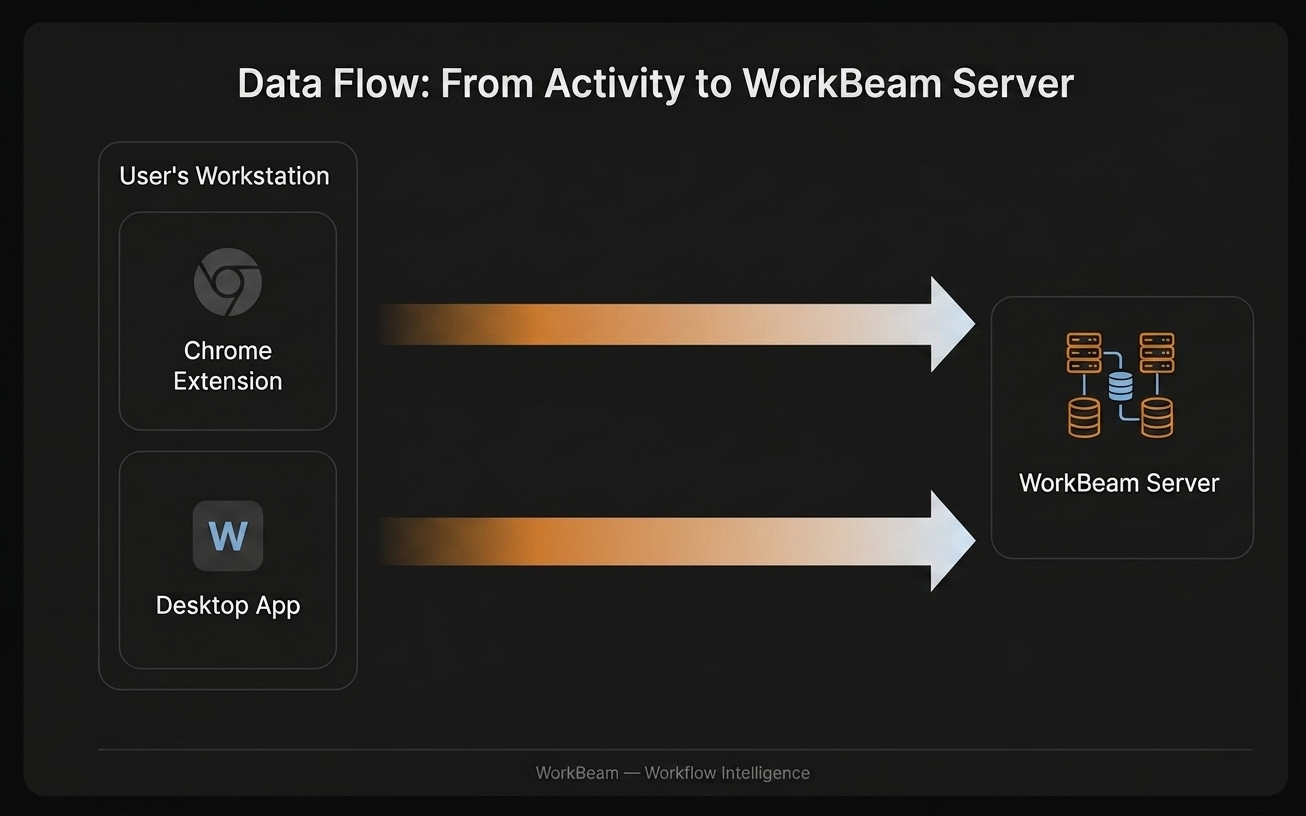
Between the two, WorkBeam sees everywhere digital work actually happens. The browser covers Gmail, Jira, your CRM, Google Docs, and every other web tool, and the desktop app picks up everything else: IDEs, email clients, design tools, and the rest of the workday. No timers, no tagging, no forms. Your team just works.
2. AI turns activity into readable work summaries
This is the part that actually matters. Raw activity data by itself is noisy, so WorkBeam turns it into simple, manager-friendly output that is easy to understand and useful in real conversations:
- Work blocks — Clear chunks of what happened during the day.
- Readable summaries — Plain-language explanations of the work, not technical logs.
- Task context — Work is connected to the right project and task so progress is obvious.
- Next steps — Follow-ups are easy to spot, so fewer things get lost.
You do not need to understand the plumbing. You just need to know that by the end of the day, the work your team did has a readable explanation attached to it.
3. The right view goes to the right person
What managers can see in WorkBeam
For managers and team leads, the value is simple: you can finally see what your team worked on, what is happening right now, and how the week is trending, without running extra status meetings or chasing people in Slack.
This is where WorkBeam becomes real team visibility software for managers. Instead of vague activity charts, you get specific visibility into what employees worked on, how their day was structured, and how the team is performing across a week.
The first management view is the team schedule. It gives you a live, visual map of the workday across the whole team.
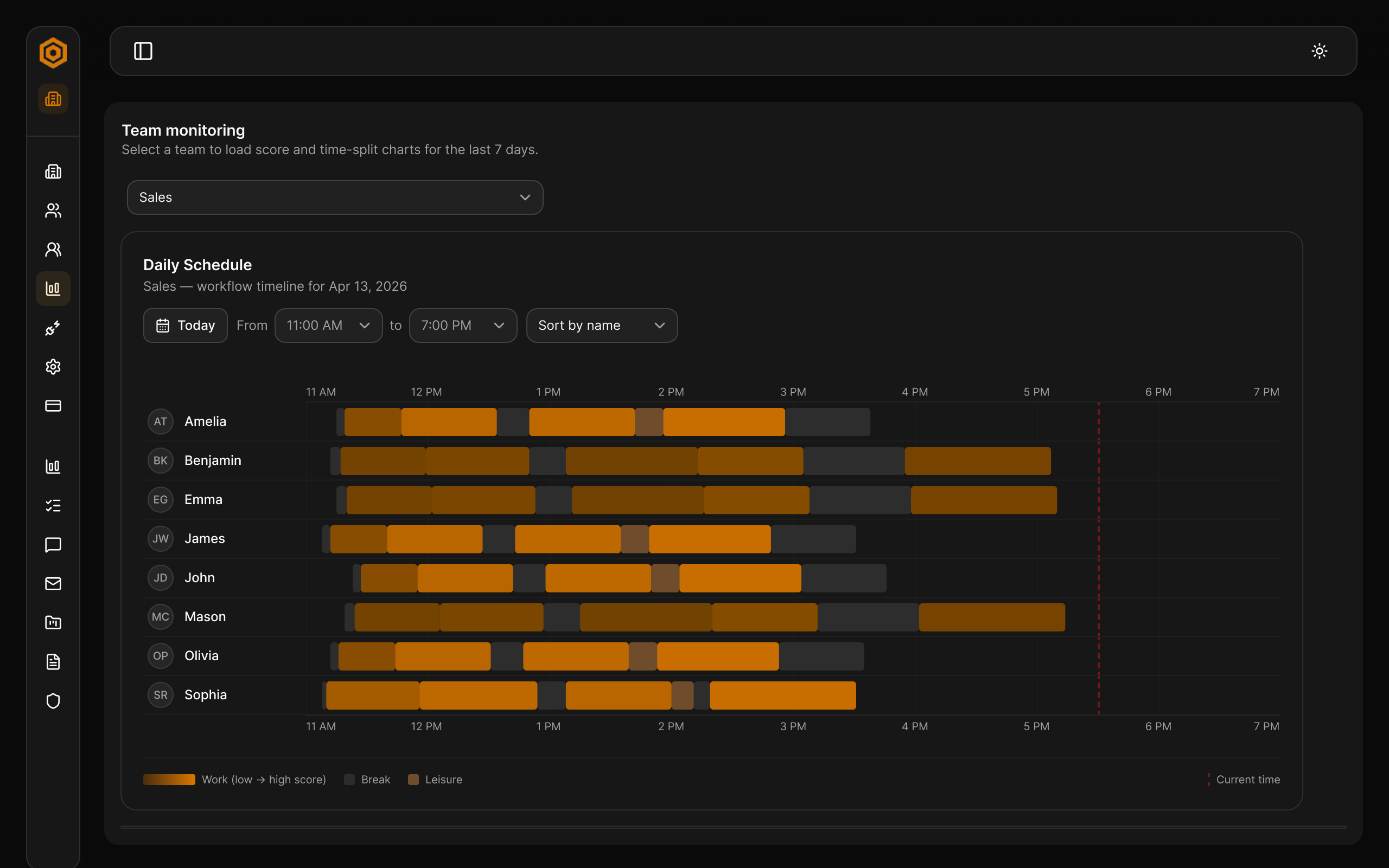
This timeline is powerful because it's both high-level and drill-down. At a glance, you see who's deep in work, who's between sessions, and where the day is going. Then you can click any block to open full workflow details: summary, full description, linked task and project, and session breakdown for that exact period. That means you can answer "what did they do from 1 to 3 PM?" in seconds, without interrupting anyone or asking for a manual update.
When you want the broader management view, not just what is happening now but how has the team been doing over time? WorkBeam gives you a team performance comparison:
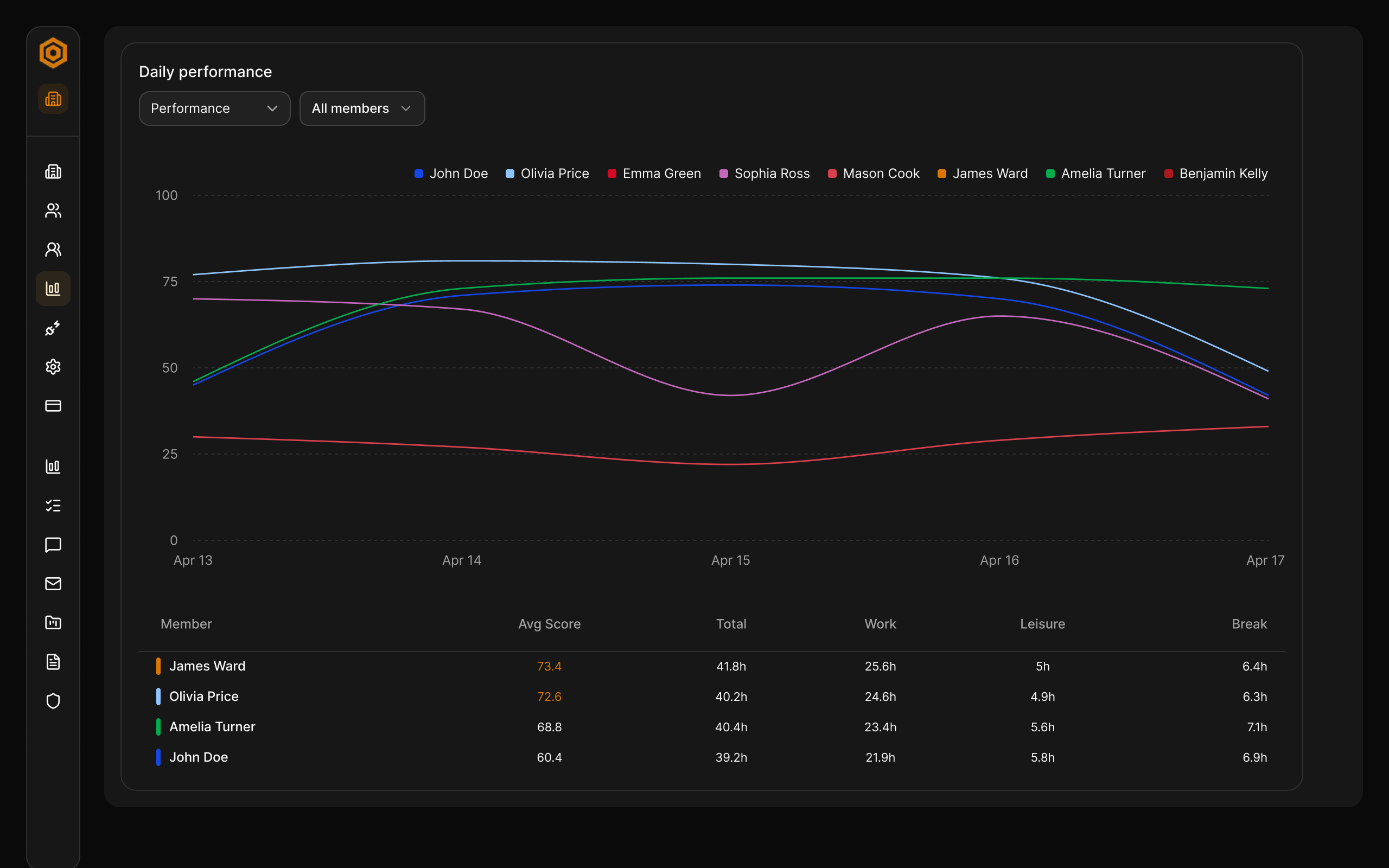
This is the Monday-morning catch-up view from the team performance card. You can pick a date range, filter which members are shown, switch between performance and hours metrics, and compare trends line-by-line. The summary table below the chart gives each person's average score plus total, work, leisure, and break hours, so follow-up conversations are grounded in one shared view instead of scattered updates.
For managers, this is what "seeing everything" should look like: not surveillance, but clear visibility into team output, momentum, and patterns. You can spot where work is moving well, where someone may need support, and where priorities may be drifting before a project goes off track.
Role-based access keeps things clean: team leads only see their own team, admins see the full organization, and individual contributors always have full visibility into their own records.
What employees see in WorkBeam
Individual contributors get a dashboard built for them, not for surveillance. It answers the practical daily questions fast: what's due, what meetings are coming up, what I spent time on today, and how my day is trending.
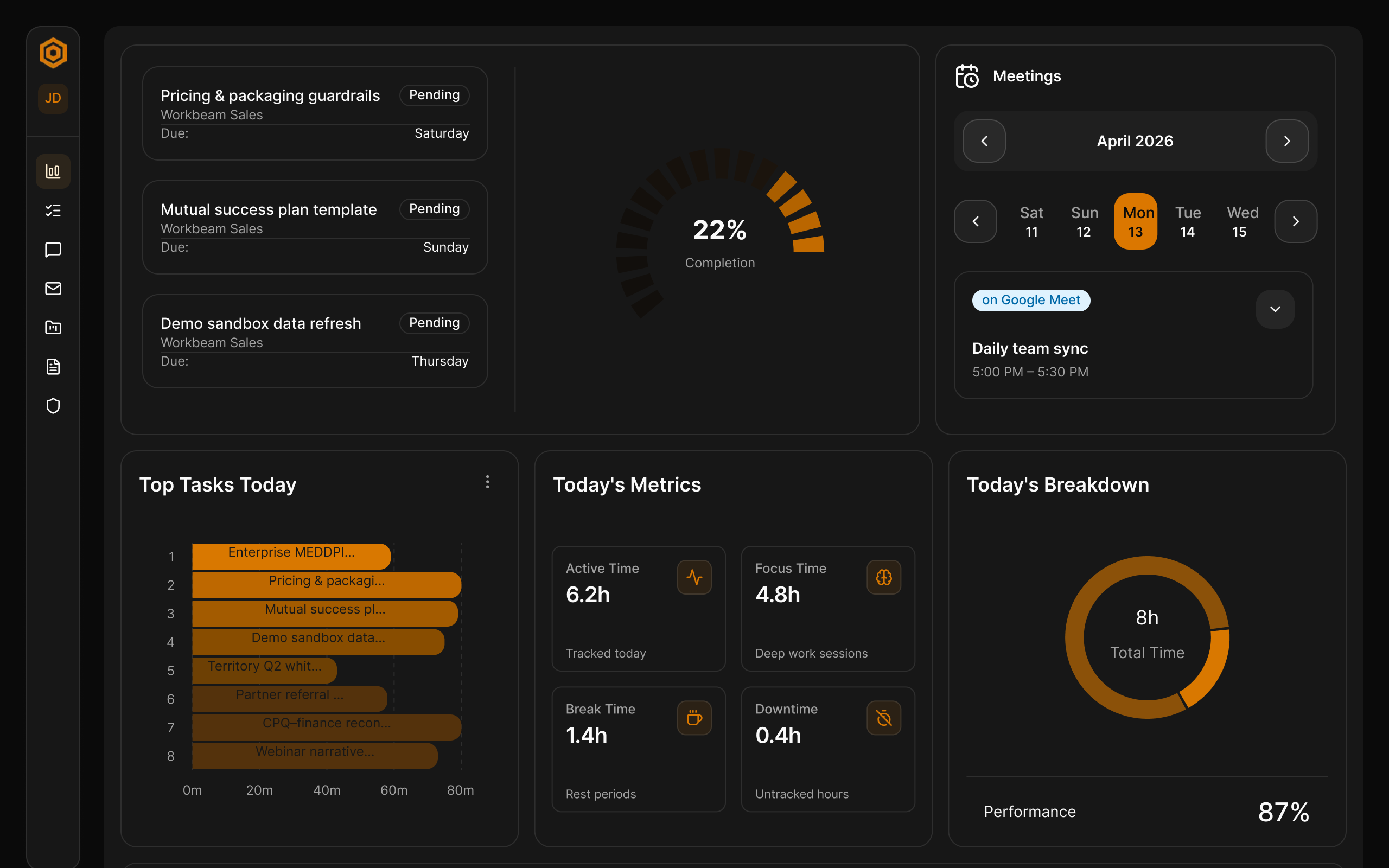
The layout is intentionally simple: quick chat input for planning, due work, today's meetings, top tasks, key metrics, work and break breakdown, activity spikes, and recent progress feed. It's useful in the first minute of the day, and it doesn't require manual updates.
Three kinds of gentle AI prompts keep people on track: a morning summary of what's on their plate, an alert when something's been left unfinished, and a "regain focus" nudge after context switches that reminds them exactly where they left off.
For people who want to understand their own patterns more deeply, there's a dedicated performance view:
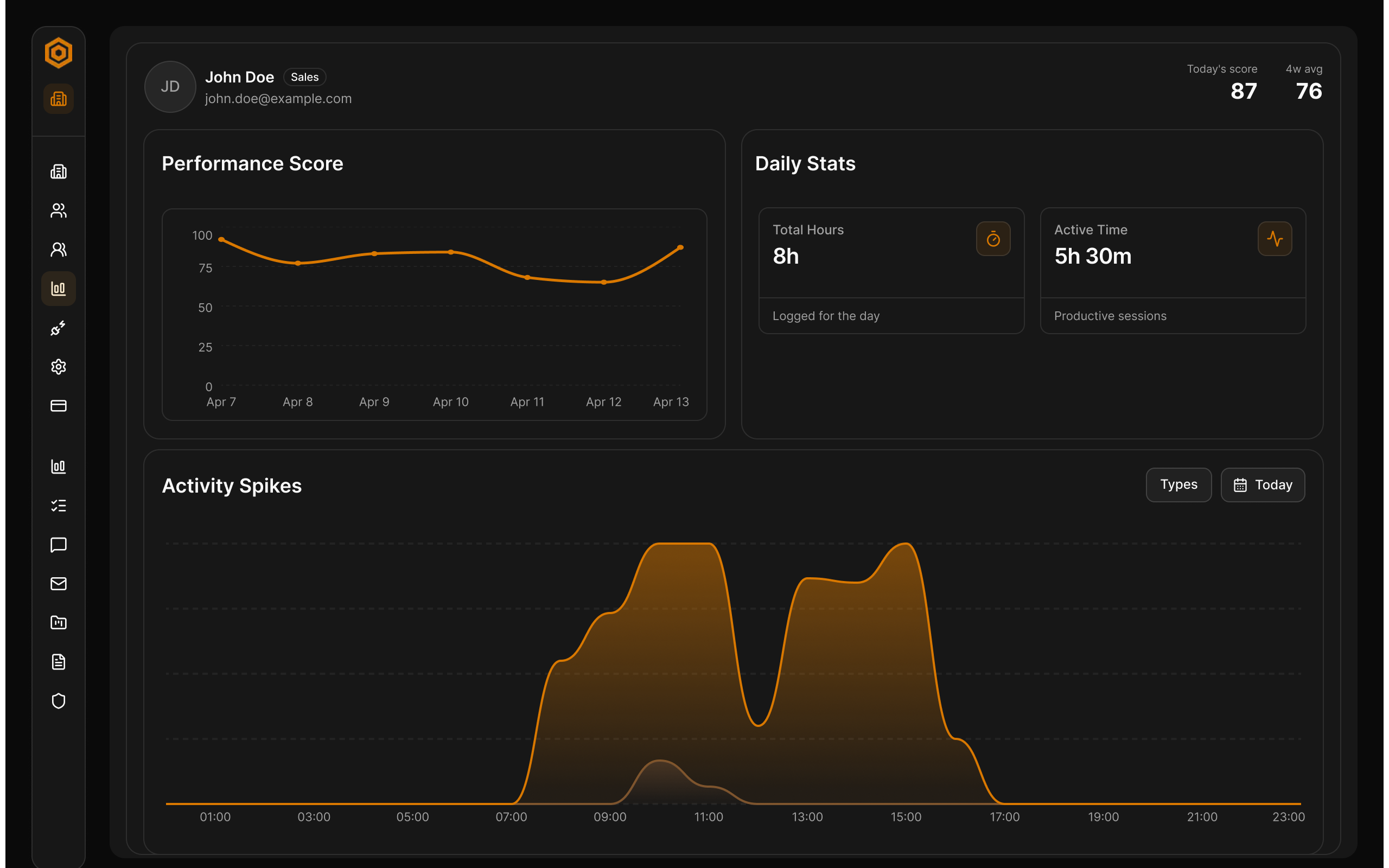
The real value here is not the score by itself, it's the shape of the day. Most people are surprised when they see their own activity curve for the first time: where their real peaks are, where the afternoon slump actually hits, which hours they shouldn't be booking meetings in. Over a week or two, it becomes a genuine self-awareness tool.
Why this matters for teams of every size
WorkBeam is equally valuable for small businesses and large enterprises — just for different reasons.
For SMBs, the manager is often the project manager and still doing real work. You don't have layers of operations staff to track what everyone is doing. WorkBeam gives you automatic visibility without hiring a reporting function.
For mid-market and enterprise organizations, the problem is different but just as painful: work is fragmented across dozens of tools, hundreds of projects, and many layers of management. Executives see status decks, not the underlying work. By the time a problem surfaces in a steering review, it has usually been real for weeks. WorkBeam gives leaders a consistent, real-time picture of what thousands of people across the organization are actually doing, without depending on manual reporting.
For teams of 100+ or organizations with SSO, procurement, or security review requirements. We will walk you through a rollout tailored to your org, IT, and compliance needs.
Talk to our team about an enterprise rollout →Most visibility tools fail both audiences. They're either too invasive (screenshot trackers that make teams feel watched), too manual (timesheets that people hate filling out), or too shallow (app-usage charts that don't tell you anything useful).
WorkBeam is built for what modern organizations actually need:
- No one has to log anything. Your team keeps doing their work.
- You get real answers, not just numbers. Written summaries, not just hours.
- Nobody feels surveilled. There are no screenshots, no keystroke logs, no webcam monitoring. Just structured summaries of work output.
- It pays for itself fast. For SMBs, it replaces status meetings and spreadsheet reporting. For enterprises, it replaces fragmented reporting layers with one consistent source of truth across teams and departments.
- It scales cleanly. Role-based access, organization-wide rollups, and department-level views mean the same product fits a 15-person startup and a 5,000-person company.
That is why WorkBeam fits teams searching for better employee productivity visibility, workforce visibility software, enterprise team productivity platforms, or automatic team reports for managers. It solves the real management problem without creating a trust problem.
Meetings: no more "what did we decide again?"
WorkBeam's AI joins your Google Meet, Zoom, or Teams calls automatically and writes up a summary afterward: what was discussed, what was decided, and who owns what next. Action items get pulled out and attributed to the right person, and they automatically connect to existing project tasks.
You can also ask questions about any past meeting in plain English: "What did we decide about pricing in last Tuesday's call?" or "Who said they'd follow up with the client?" You get an answer based on the actual transcript.
For SMB leaders in back-to-back meetings, this alone can save hours a week. For enterprise teams running multi-team calls, it means decisions and owners are captured consistently across the organization, without someone being the designated note-taker.
Email: triage and drafts that actually sound like you
Every email that comes in gets sorted: does it need a response, is it informational, is it urgent? When something needs a reply, WorkBeam drafts it for you, using the context of what you've actually been working on recently. You edit, approve, send.
This isn't a generic AI writing tool. The drafts reference real projects, real people, and real context from your actual work.
Ask your work anything
Because WorkBeam has a real picture of what your team is doing, you can ask it questions and get useful answers:
- "What did Sarah work on this week?"
- "Which project are we spending the most time on?"
- "What's blocking the website redesign?"
- "Summarize what my team accomplished in April."
The answers come from your actual work record — not generic advice from the internet.
Works with the tools you already use
WorkBeam does not replace anything. It connects to your existing stack:
| Connects to | What it does |
|---|---|
| Google Calendar & Outlook | Automatic meeting awareness |
| Gmail & Outlook | Triage, classification, AI drafts |
| Google Drive & OneDrive | Read and analyze your documents |
| Jira | Project and issue sync |
| Chrome & Desktop | Activity capture across every tool |
If your team works on computers, WorkBeam covers it.
You'll have your first useful report within an hour
Install takes under ten minutes per person and rolls out cleanly whether you're deploying to one team or a whole organization. A quick onboarding chat asks a few questions about roles and current projects. The extension starts capturing immediately, and by the end of the first work session you'll have your first real workflow summaries to look at.
Most teams tell us the "aha" moment comes on day two, when a manager opens the dashboard in the morning and sees a clear picture of what happened the day before, without having asked anyone to write a status update. In larger organizations, leaders typically see the same effect at the weekly review, with fewer slides and more real signal.
FAQs
Is this going to feel like surveillance to my team?
No. There are no screenshots, no keystroke logs, and no webcam monitoring. WorkBeam captures work output — what was built, written, researched, or discussed — and turns it into readable summaries. Individual contributors get a useful personal dashboard too, so it's a real tool for them, not just a way for managers to watch them.
How is this different from Hubstaff, Time Doctor, or similar tools?
Those tools tell you how long an app was open. WorkBeam tells you what was actually accomplished. Instead of a bar chart showing six hours in Chrome, you get a written summary explaining that your engineer spent those hours fixing a login bug, reviewing a pull request, and researching a new payment integration.
Do my team members have to change how they work?
No. After installing the Chrome extension and desktop app (under two minutes), they work exactly as they always have. There's nothing to start, stop, tag, or fill out.
We're a 15-person company. Is this overkill?
It's actually built for teams your size. Large enterprises have whole operations teams to track work. SMBs don't, which is exactly why automatic visibility matters more when you're small. If you're spending an hour a week in status meetings just to understand what's happening, WorkBeam pays for itself quickly.
We're a large enterprise with thousands of employees. Does WorkBeam scale?
Yes. WorkBeam supports organization-wide deployments with role-based access, department and team rollups, enterprise single sign-on, and consistent visibility across thousands of users. Leaders get a unified view across teams and departments, while managers see only their own org and individual contributors see only themselves.
Does it work for hybrid or in-office teams, or just remote?
Any team doing digital work. Remote, hybrid, in-office — it doesn't matter. As long as the work happens on a computer, WorkBeam captures and structures it.
What happens to the data if someone leaves the company?
Admins control access. When someone leaves, their seat can be removed and access revoked. Historical work records remain with the organization, and role-based rules ensure only the right people can see them.
Ready to see what your team actually did today?
Set up WorkBeam in under 10 minutes and get your first real team summaries the same day — no timesheets, no screenshots, no status meetings.
No credit card required · Installs in under 10 minutes · SSO available
Rolling out to a larger organization? Talk to our team →